Convert
Convert SDF shapes into standard Blender mesh objects. Chisel provides two meshing algorithms, each with different strengths. Multiple objects can be converted at once.
Basic Usage
- Select one or more Chisel objects
- Click To Mesh in the Object Properties panel, or use the Pie Menu (
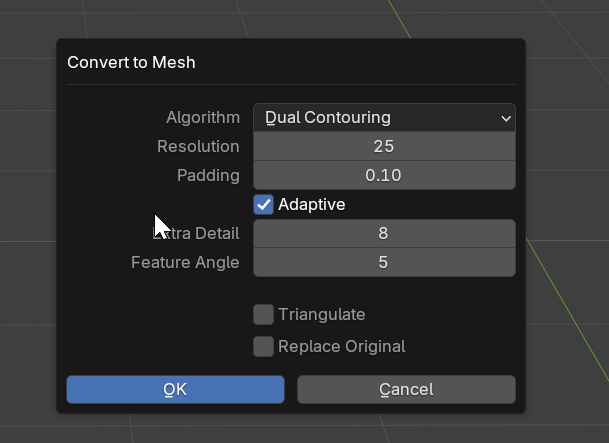
Q) > North - A settings dialog appears with a live grid overlay previewing the cell size
- Choose the algorithm and adjust settings, then confirm
- The SDF is sampled and a polygon mesh is generated
Converted meshes are placed in a Remesh collection. If Replace Original is enabled, the original object is converted in place instead.
Common Parameters
Cell Size
- Range: 0.001 to 1.0 (soft max)
- Default: 0.1
- Unit: Blender units (length)
- Effect: Size of each grid cell. Smaller values produce more detail but slower conversion. The grid resolution is computed automatically from the cell size and the object’s bounding box
SDF Normals
- Type: Boolean
- Default: True
- Effect: Compute SDF gradient normals and apply as custom split normals on the converted mesh. Produces smoother shading that matches the ray-marched preview
Replace Original
- Type: Boolean
- Default: False
- Effect: Replace the SDF object, or create a new mesh alongside it
Algorithms
Dual Contouring (Default)
Produces quad-dominant meshes with sharp edge preservation using QEF (Quadratic Error Function) solving.
- Quad-dominant output topology
- Sharp edge preservation via QEF solver
- Best overall choice for hard-surface models
- Supports adaptive octree refinement
Additional options (Dual Contouring only):
| Parameter | Range | Default | Effect |
|---|---|---|---|
| Detail Size | 0.0001 to 0.1 | 0.01 | Cell size near features in Blender units. Independent of base Cell Size. When smaller than Cell Size, enables adaptive refinement |
| Feature Angle | 5-90 | 15 | Normal deviation in degrees that triggers refinement (lower = more detail) |
Marching Cubes
Classic algorithm that produces triangular meshes.
- Triangle output topology
- Good for smooth surfaces without sharp features
- Uniform grid sampling (no adaptive refinement)
- Resolution capped at 1024 to prevent excessive memory usage
See Also
- Rebuild Mesh - Update visualization without full conversion
- Baking - Generate texture maps from SDF