Object Tab
The main panel for controlling individual SDF objects. Found in Object Properties.
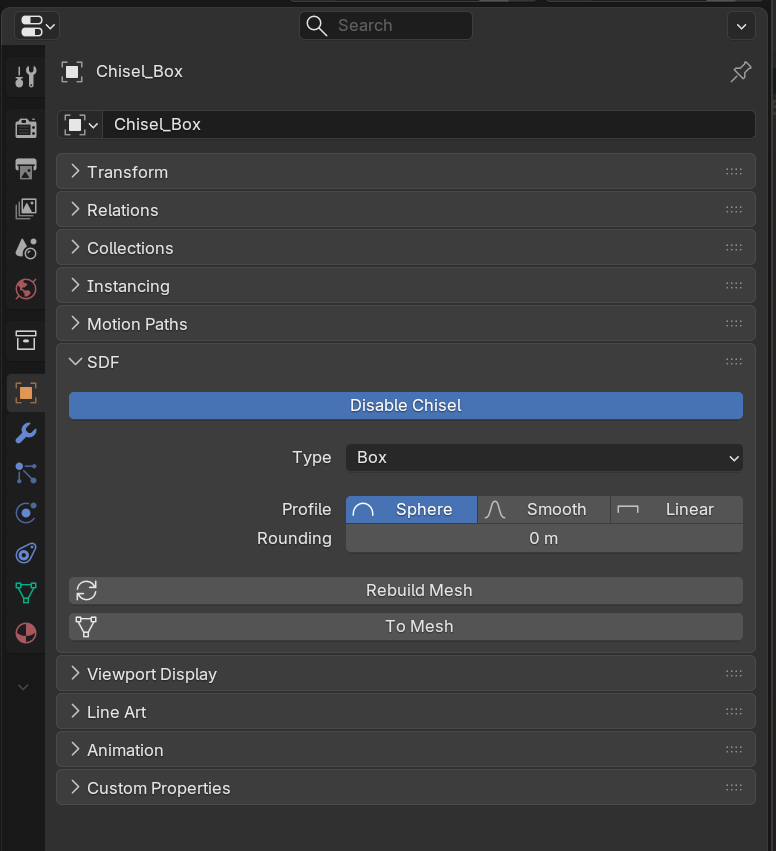
Properties
- Is Chisel: Toggle to enable/disable SDF on an object
- Primitive Type: Selector for the available shapes (with custom icons)
- Rounding: Edge radius slider (0.0-10.0, soft max 2.0)
- Profile: Round / Sharp / Soft / Tight / Chamfer profile selector
- Rebuild Mesh: Update the visualization mesh
- To Mesh: Convert SDF to standard mesh
Primitive-Specific Properties
Depending on the selected primitive type, additional properties appear:
- Cone: Cap ratio (0 = pointed, 1 = full cylinder)
- Torus: Major Radius (default 0.7), Minor Radius (default 0.3)
- Prism: Sides (3/5/6/8), Angle (3-sided only), Bevel, Bevel Profile, Cap Rounding
- Trapezoid: Cap ratio, Bevel, Bevel Profile, Cap Rounding
- Curve: Curve object pointer, Depth
- Curve Tube: Curve object pointer, Tube Radius (default 0.2)
- Curve Revolve: Curve object pointer, Revolve Angle (default 360°)
See Also
- Primitives - Detailed per-primitive documentation
- Rounding - Edge profile details
- Clean - Detach boolean operands
- Modifier Tab - Modifier settings