Pie Menu
Press Q in Object Mode to open the Chisel Pie Menu. Provides context-aware quick access to all operations. Primitives and modifiers display custom icons.
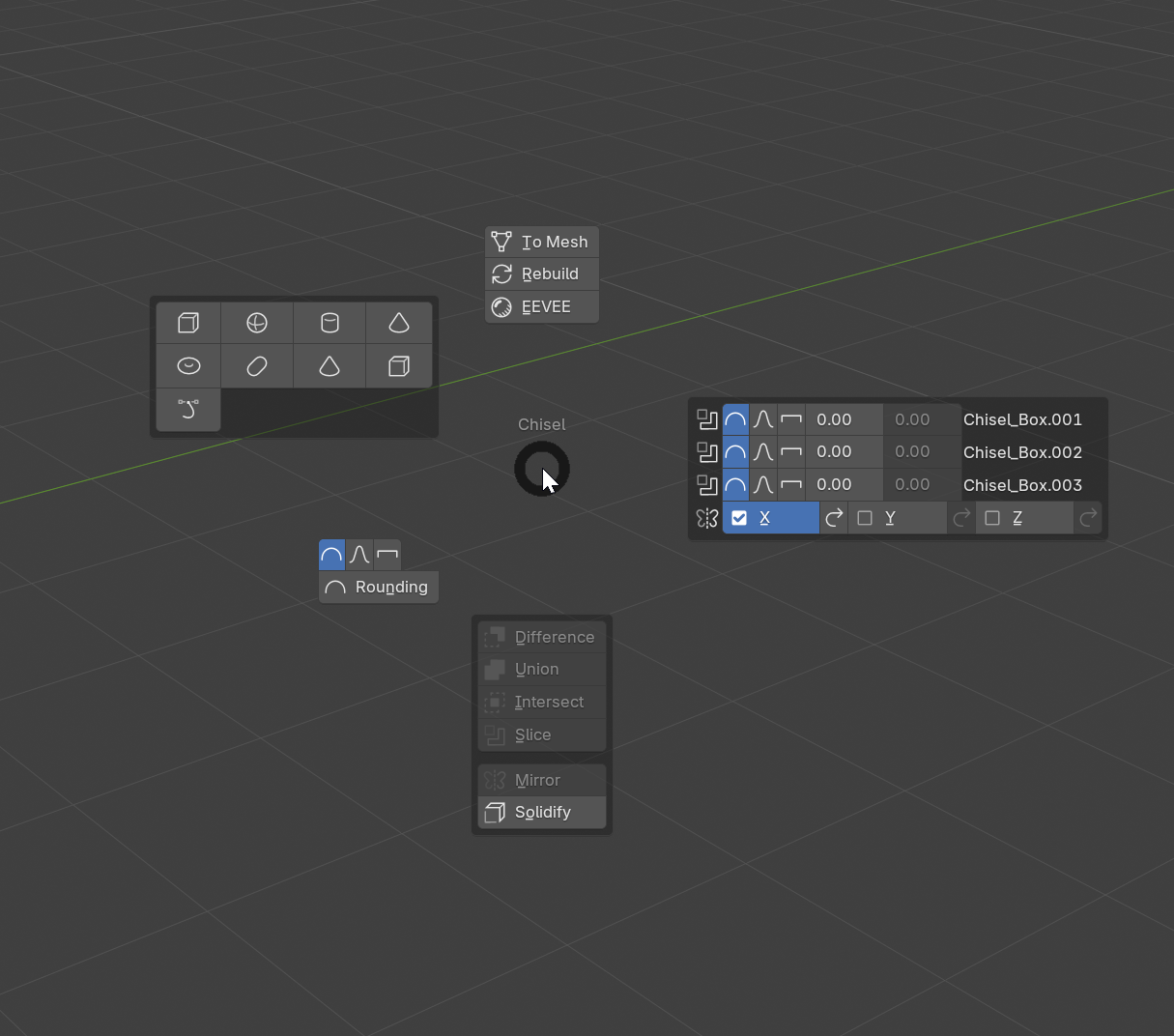
Layout
| Position | Contents |
|---|---|
| North | To Mesh, Rebuild, Renderer Toggle |
| East | Modifier controls (profile, blend radius, target) |
| South | Boolean quick-add (Diff/Union/Intersect), Slice, Mirror, Mirror Smooth, Solidify, Array, Circle Array |
| North-West | Primitive grid (all shapes with custom icons) |
| South-West | Primitive controls (profile, rounding, smooth) |
Context Awareness
The Pie Menu adapts based on the current selection:
- Primitive controls show settings for the active object’s primitive type
- Modifier controls show settings for the active modifier
- Blend controls appear if the object is used as a boolean target
- Mirror Smooth launches the modal operator for interactive blend radius adjustment
See Also
- Keymap Reference - Complete shortcut list
- Object Tab - Full primitive settings
- Modifier Tab - Full modifier settings