
Performance
The v4 renderer runs the heavy work on the GPU and refines the frame in rungs. While you orbit, pan, or drag a gizmo it renders at a coarse rung that holds your target framerate; once you stop, it climbs rung by rung to full quality. On top of that, shapes bake into sparse brick volumes incrementally and in the background, so editing a detail no longer re-bakes the whole object.
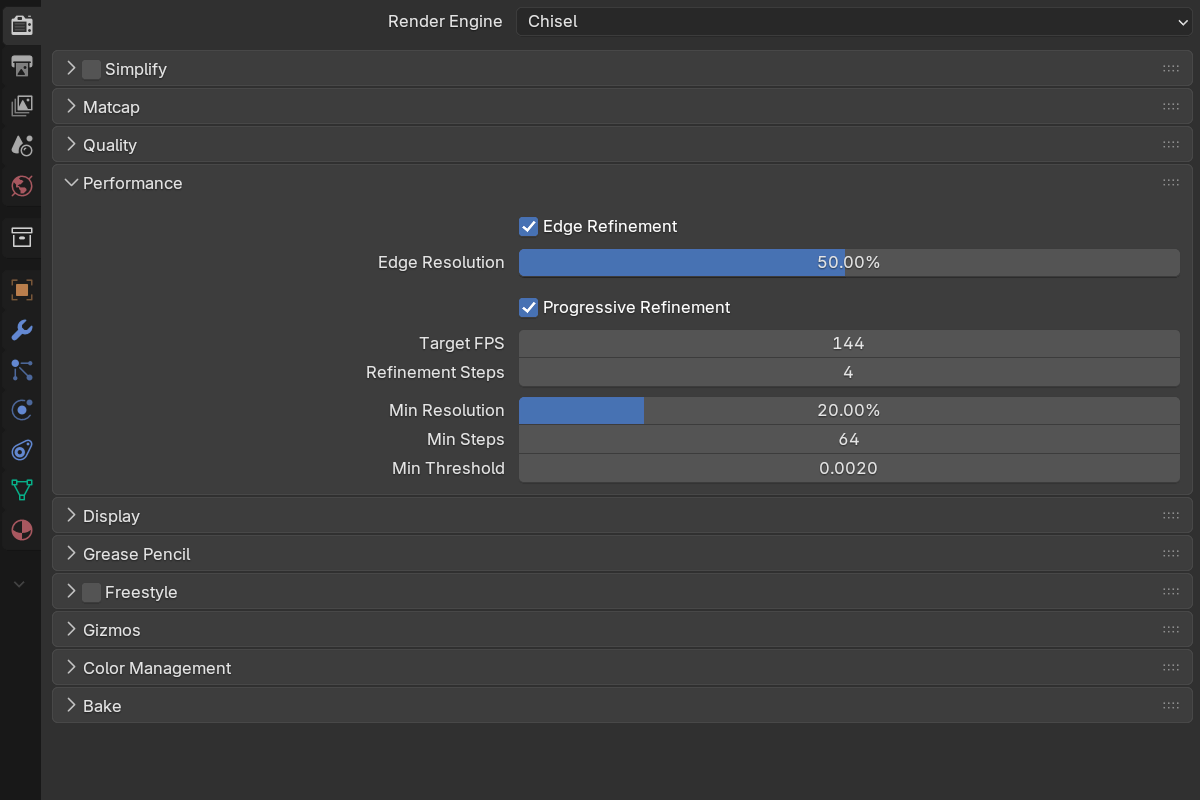
Progressive refinement
Instead of a hard navigation/settled split, the renderer walks a ladder of quality rungs. Rung 0 is the coarse interactive pass; the top rung is full Quality. Any motion — camera move, an edit, a modal property change — drops back to the interactive rung and restarts the climb.
- Progressive Refinement — default on. Off = full quality every frame, no ramp.
- Target FPS —
5–200, default144. The framerate the interactive rung aims to hold. The picker drops to a lower rung on heavy frames and rises back up when the GPU has headroom. - Refinement Steps —
1–12, default4. How many rungs sit between the minimums and full quality. More rungs = a smoother ramp but more passes;1= always full quality, no ramp. - Min Resolution —
1–100%, default20%. Rung 0’s resolution — the coarsest the interactive pass will drop to. - Min Steps —
4–128, default64. Rung 0’s ray-march step budget. Kept high enough that the march still reaches surfaces while moving. - Min Threshold —
0.0001–0.05, default0.002. Rung 0’s hit threshold, tightening toward Hit Threshold as it refines. Set it equal to Hit Threshold to keep the surface exact across all rungs, with no silhouette shift while refining.
Edge refinement
- Edge Refinement — default on. On settled frames, re-march only the detected edge pixels — silhouettes, boolean seams, small objects — at a higher resolution than the base frame. Sharp edges over a cheap low-resolution base.
- Edge Resolution —
1–100%, default50%. The resolution those edge pixels are re-marched at, relative to the viewport. It only has an effect above the base Resolution;100%gives native-resolution edges.
This is usually a better trade than raising Resolution outright: edges are where low resolution is visible, and they are a small fraction of the pixels.
Incremental brick bakes
Shapes bake into sparse brick volumes rather than being evaluated from scratch every frame. In v4 those bakes are:
- Incremental — only the edited region of a shape re-bakes
- Asynchronous — the bake runs in the background, so dragging and drag-release no longer hitch
- Coarsening under load — large shapes coarsen while you drag and sharpen on release, so scaling stays smooth
- Move-aware — moving a whole chain rigidly around the scene skips the proxy re-bake entirely; a content signature detects that the result would be bit-identical
- Instance-aware — static camera orbits no longer re-bake unchanged mirror or array shapes
Brick budget warnings
When a chain’s bricks exceed the page budget, the panel lists the offending objects by name:
- detail coarsened N× — the object rendered, but past the smart cap, so it is blurrier than World Cell Size implies
- analytic fallback (slow) — the object fell back to the analytic march, the measured performance cliff
Fix by lowering Resolution, raising World Cell Size, or splitting the object. A second box lists chains where adaptive fine detail kicked in, with the region count and how much finer they went — useful for confirming that a fine feature is actually getting the resolution you think it is.
Per-chain limits
Each chain is capped at 256 primitives and 512 instructions. The modifier panel’s toolbar shows an Objects N/256 readout for the active object’s chain, turning red past ~80% of the budget; a Modifiers M/… readout appears once that cap is half used. Over-limit primitives are dropped and the instruction list is truncated, with at most a console warning.
See also
- Quality — settings the top rung and the F12 render use
- F12 Render — the camera render forces full quality (no ramp)
- Display → Proxy Mesh — alternative viewport for EEVEE/Cycles