
Display
How Chisel objects appear in the viewport when they’re not being ray-marched, plus the proxy-mesh bake that makes them work in EEVEE / Cycles / Solid view and the storage budget for baked mesh-SDF grids.
For the in-viewport gizmo toggles (arcs, modifier dots, Ngon handles), see Gizmos.
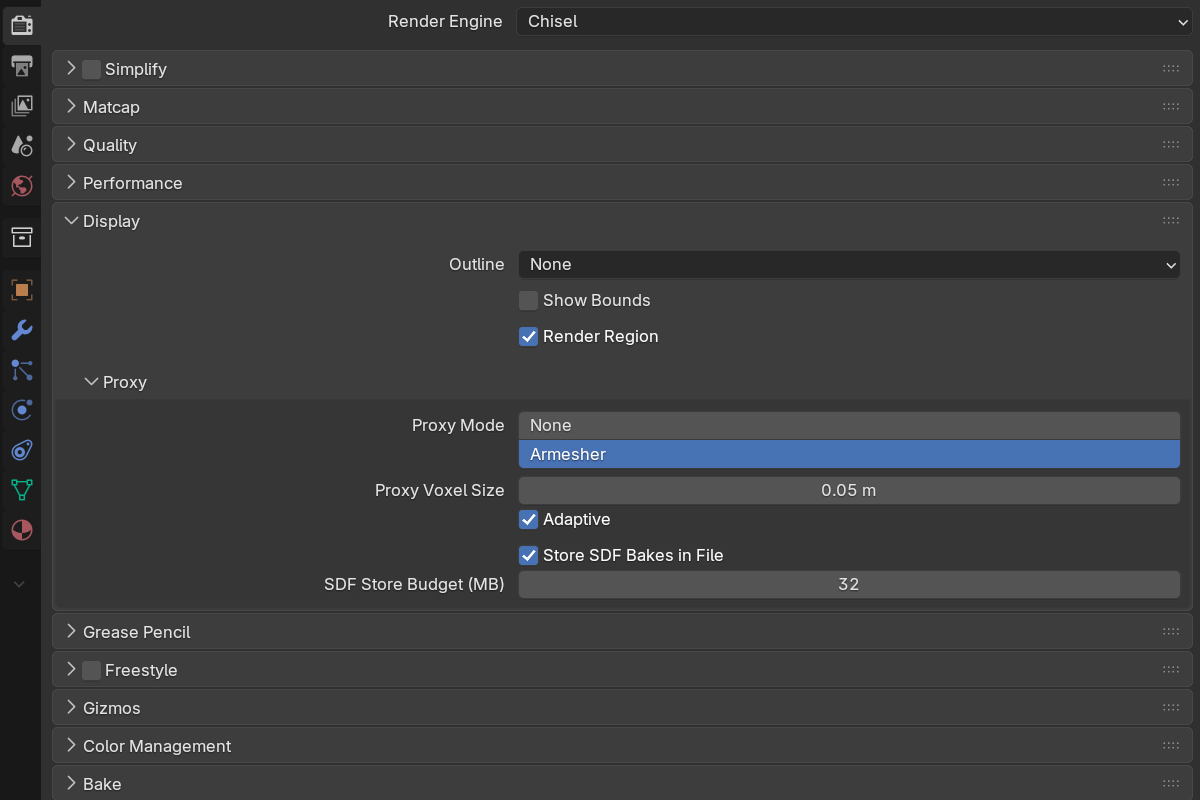
Parameters
Outline and Show Bounds are scene-level defaults applied to new boolean targets and cutters as they’re created — they don’t retroactively change objects already in the scene.
- Outline —
None / Wire / Bounds, default None. The display type given to new targets/cutters:- None — leave the display type unchanged.
- Wire — show new targets as wire outlines.
- Bounds — show new targets as bounding boxes (shape-matched to the primitive type).
- Show Bounds — default off. When on, new boolean targets/cutters get Blender’s native bounding-box display so non-rendered helpers stay visible as a box.
- Render Region — default on. Limit rendering to Blender’s render border (
Ctrl + Bin the viewport,Ctrl + Alt + Bto clear), the same way Cycles does. A quick way to cut GPU load while working on one corner of a heavy scene.
Render flag vs. viewport display
Each Chisel object has a Render toggle (render_sdf, default on) in the Object Properties → SDF panel. It decides only whether the SDF engine renders that object — it’s fully decoupled from how the object looks in the viewport. Helper objects, boolean operands, and reference geometry typically have Render off.
Because render visibility and viewport display are independent, you can hide a shape from the render without hiding it in the viewport: turn Render off and the object still shows as its proxy mesh, wire, or bounds. Flipping Render back on renders it again regardless of its display type. The Outline and Show Bounds defaults above just set how freshly created cutters first appear.
Proxy mesh
Chisel can bake a low-resolution mesh proxy from each SDF object so it renders correctly in EEVEE, Cycles, and Solid shading — and so snapping, selection, and raycasting work on the SDF surface. The controls live in the Proxy sub-panel.
Chain bases (objects carrying Chisel modifiers) are what get a proxy; standalone primitives with no modifiers always show their own base mesh.
Proxy parameters
- Proxy Mode
- None — no proxy. The base mesh stays as-is.
- Armesher — bake a low-res proxy on each settle. Accurate, and debounced so it only runs once you stop moving.
- Proxy Voxel Size —
0.001–10.0scene units, default0.05. Voxel edge length for the proxy bake.- When Adaptive is off, this is the world-space voxel size for every object.
- When Adaptive is on, this is the voxel size for a 2 m reference object — smaller objects get proportionally smaller voxels, larger objects get larger voxels.
- Adaptive — default on. Scales voxel size with object dimensions so every Chisel object ends up with roughly the same cell count.
In v4 the proxy bake runs on a worker thread, so mesh-prim chains (which used to cost up to about a second per edit) no longer block the UI, and moving a chain rigidly around the scene skips the re-bake entirely.
Mesh-SDF storage
Mesh primitives carry a baked signed-distance grid. These two settings decide whether that grid is saved with the file or re-baked on open.
- Store SDF Bakes in File — default on. Persist mesh-SDF grids, compressed, inside the
.blend, so reopening the file skips the re-bake. Data is written only on file save. - SDF Store Budget (MB) —
1–512, default32. Per-grid size cap for that storage. Grids larger than the budget are never stored; they re-bake in the background when the file opens, keeping saves fast and files lean.
Opening a file whose grids weren’t stored no longer freezes the viewport: the missing grids re-bake on a background thread and each prim appears as soon as its bake lands.
If you ever see a version mismatch warning on the proxy library, click Update Native Libraries in Preferences and restart Blender.
See also
- Gizmos — viewport gizmo overlay toggles
- Matcap — viewport shading
- Performance — progressive refinement while you interact
- Primitives: Mesh — what those stored grids belong to
- Operations: Convert — full mesh conversion (separate from the proxy)
- Operations: Veil — quickly hide every non-rendered object