
Mirror
Reflect an object across one or more planes. Mirrors give you a single, watertight result — no merge problems, no flipped normals — so an object mirrored across X + Y + Z is still one clean shape.
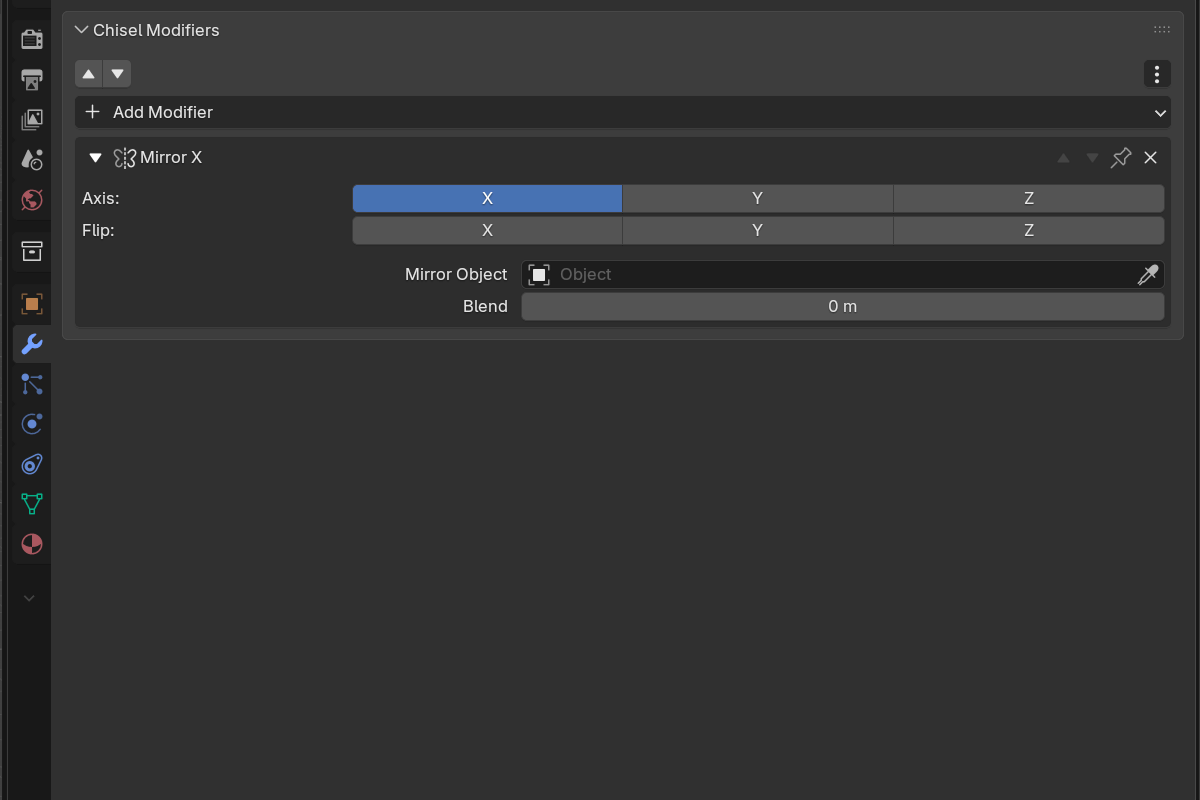
Parameters
- Axis — toggle X / Y / Z (X on by default). Mirror across any combination of planes at once.
- Flip — X / Y / Z toggles choose which side to keep when bisecting on that axis.
- Mirror Object — optional pointer to any other object whose local axes and position define the mirror plane. Leave it empty to mirror across the modified object’s own origin. Like Blender’s own Mirror modifier there is no filter, so you can mirror across a primitive, a mesh, or an empty — and moving that object updates the result live.
- Blend — smooth fillet radius at the mirror plane (
0.0–2.0, soft max0.5).0.0= sharp bisect.
Mirror across the active object
The Mirror entry in the Add Modifier menu (and the pie menu) works on the whole selection. Select two or more shapes with the one you want to mirror across as the active object, then pick Mirror: every non-active shape gets a Mirror modifier whose Mirror Object is set to the active one — so they all reflect across the active shape in a single step. With only one shape selected, Mirror just adds a self-mirror across its own origin.
Mirroring with Rotor
Rotor is a separate, free and open-source Ezelar addon whose Mirror tool drives Chisel mirrors directly from the viewport — six axis handles around the object instead of a panel field.

With Rotor installed, press Alt + X to call the mirror gizmo on the selection: colored handles appear along ±X, ±Y and ±Z. Click one and Chisel gets the mirror:
- Clicking X+ / Y+ / Z+ or X− / Y− / Z− adds a Chisel Mirror modifier on that axis — negative directions come in with the matching Flip toggle set.
- Clicking the same handle again cycles that axis through positive → flipped → off, so you can dial symmetry in and out without opening the modifier stack.
- The new modifier is pinned, so it stays at the end of the stack and every boolean you add afterwards slots in ahead of it — the symmetry always applies last.
- The tool’s Pivot and Orientation choices become the modifier’s Mirror Object: mirror across the world, the object’s own axes, the 3D cursor, or a picked custom plane.
Rotor detects Chisel objects through the registered chisel property group rather than importing the addon, so it wires a real Chisel modifier item instead of a Blender Mirror modifier — the result stays a single watertight SDF surface with a live blend at the seam. Its Real mode duplicates a Chisel object as a shared-data instance flipped across the plane, rather than copying mesh data.
Tool keys, once the Mirror tool is active:
| Key | Action |
|---|---|
Alt + X | Call the mirror gizmo |
Space | Pick a custom plane |
Q | Cycle orientation (Global / Local / Cursor / Custom) |
E | Cycle pivot |
Esc / RMB | Back to the fallback tool |
None of this is required — Chisel’s own Mirror modifier is fully usable on its own. Rotor just replaces the panel round-trip with a click on an axis handle.
See also
- Boolean — combining mirrored shapes with siblings
- Bisect — cutting against a plane instead of reflecting across one
- Array — for repetition rather than reflection
- Rounding & Blending — what the blend radius does mathematically