
Performance
The v3 renderer runs the heavy work on the GPU and splits drawing into two states. While you orbit, pan, or drag a gizmo, Chisel draws a synchronous navigation frame at reduced resolution for zero-lag feedback; once you stop, a full-quality frame settles on a background worker and lands when it’s ready.
The GPU compute pipeline
Tile binning, per-tile primitive masks, interval pruning, and tape compaction all run as GPU compute passes — the CPU no longer touches per-tile work. Each chain carries its own occupancy grid so rays skip empty space (this replaces the old scene-wide grid), tiles are walked front-to-back, and the per-chain step budget is tiered by primitive count.
The two-state render loop
Adaptive Quality drives a small state machine instead of spinning between frames:
- Navigation — the frame at your current pose, drawn synchronously at the adaptive (dynamically scaled) resolution and step budget. Zero lag.
- Settling — when the view has been still for a moment, one full-quality job is posted to a background Rust worker. It tiles and renders the whole image itself while the navigation frame stays on screen.
- Settled — the finished image lands and is reblitted from cache with no further GPU work.
Any motion — camera move, an edit, a modal property change — resets to navigation and cancels the in-flight settle. The status bar shows Chisel: 0/1 while navigating or waiting on the worker, and Chisel: 1/1 once the full-quality image is on screen.
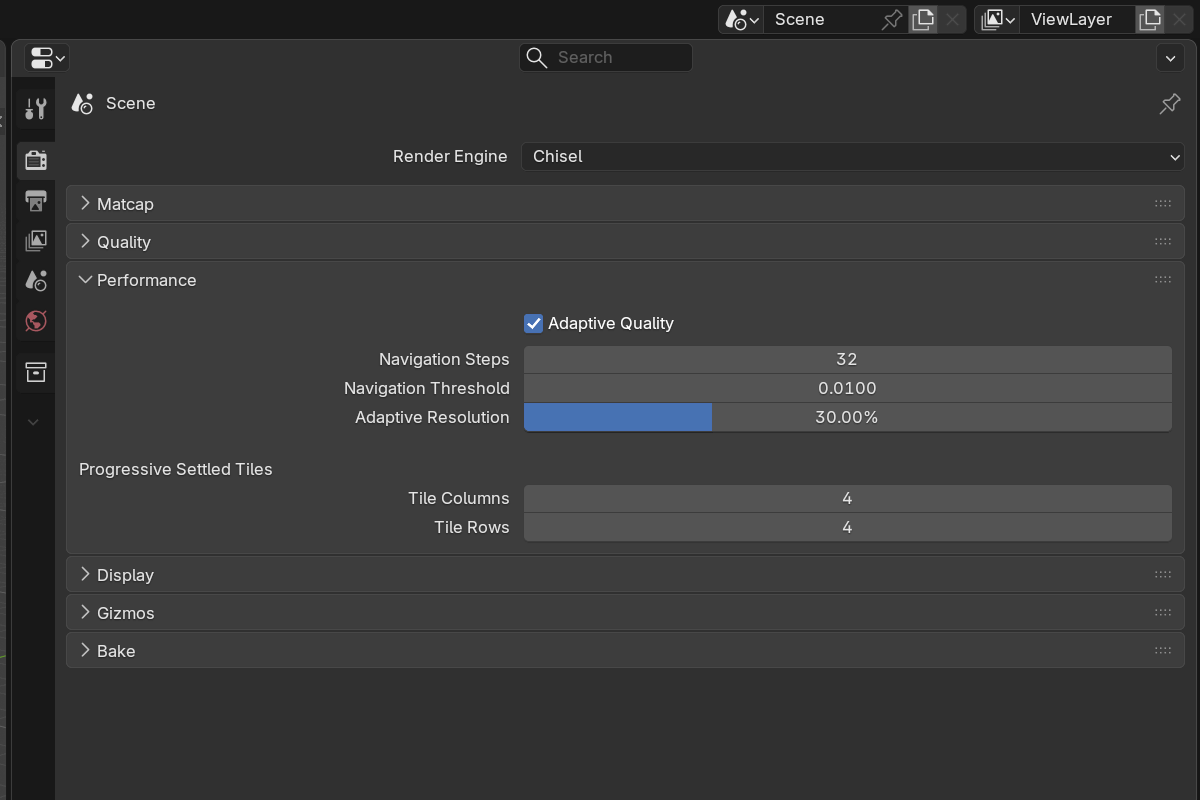
Adaptive Quality (while navigating)
- Adaptive Quality — default on. Master toggle for the navigation downscale. With it off there is no state machine: every frame renders at the full Render Resolution.
- Navigation Steps —
4–128, default48. Max ray-march steps while moving (lower = smoother navigation). - Navigation Threshold —
0.001–0.05, default0.0050. Hit threshold while moving (higher = faster). - Adaptive Resolution —
1–100%, default40%. Resolution while interacting. When Dynamic Resolution is on this is the ceiling — the quality used when the GPU has headroom.
Dynamic Resolution
Dynamic Resolution auto-adjusts the navigation resolution to hold a target framerate: it drops toward Min Resolution on heavy frames and rises back toward Adaptive Resolution when the GPU has headroom. The step count is trimmed alongside the resolution, so heavy chains stay smooth.
- Dynamic Resolution — default on. Off = fixed navigation resolution at Adaptive Resolution.
- Target FPS —
10–144, default60. The navigation framerate the scaling aims to hold. - Min Resolution —
1–100%, default15%. The lowest resolution dynamic scaling will drop to.
Clean-frame caching
Camera-only frames reuse their tiles, tapes, and materials — an edit invalidates just the touched object or material instead of the whole scene. The empty-scene clear frame is cached and reblitted rather than re-uploaded every tick.
Per-chain limits
Each chain is capped at 256 primitives and 512 instructions. These limits are not surfaced in the UI or as a popup — over-limit primitives are silently dropped and the instruction list is truncated, with at most a console warning (the console is quiet by default in v3).
See also
- Quality — settings used for the settled, full-quality frame
- F12 Render — the camera render forces full quality (no navigation pass)
- Display → Proxy Mesh — alternative viewport for EEVEE/Cycles