
View Markdown
Mirror
Reflect an object across one or more planes. Mirrors give you a single, watertight result — no merge problems, no flipped normals — so an object mirrored across X + Y + Z is still one clean shape.
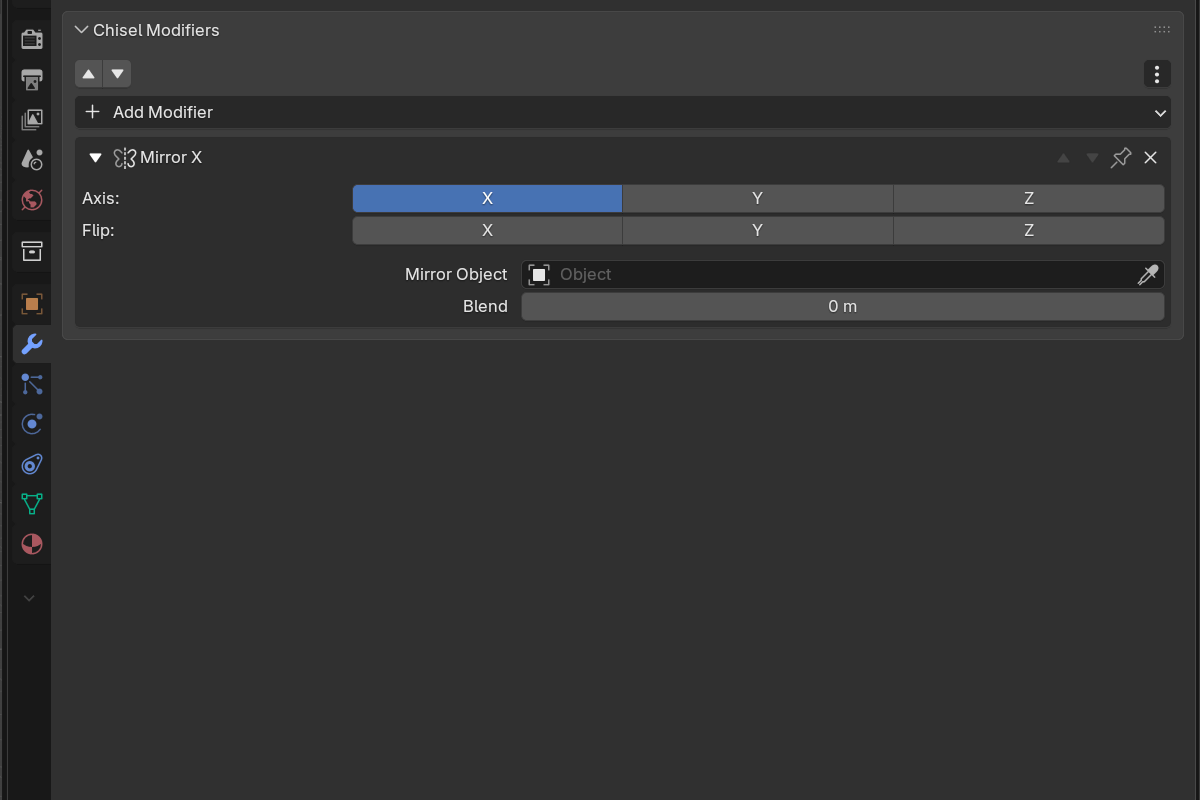
Parameters
- Axis — toggle X / Y / Z (X on by default). Mirror across any combination of planes at once.
- Flip — X / Y / Z toggles choose which side to keep when bisecting on that axis.
- Mirror Object — optional pointer to any other object whose local axes and position define the mirror plane. Leave it empty to mirror across the modified object’s own origin. Like Blender’s own Mirror modifier there is no filter, so you can mirror across a primitive, a mesh, or an empty — and moving that object updates the result live.
- Blend — smooth fillet radius at the mirror plane (
0.0–2.0, soft max0.5).0.0= sharp bisect.
Mirror across the active object
The Mirror entry in the Add Modifier menu (and the pie menu) works on the whole selection. Select two or more shapes with the one you want to mirror across as the active object, then pick Mirror: every non-active shape gets a Mirror modifier whose Mirror Object is set to the active one — so they all reflect across the active shape in a single step. With only one shape selected, Mirror just adds a self-mirror across its own origin.
Use cases
- Symmetric mech parts — model one half, mirror across X for free symmetry
- Architectural facades — central feature mirrored across both horizontal axes
- Off-origin symmetry — point Mirror Object at an empty and slide it to retarget the mirror plane live
- Organic forms — combine mirror with twist or bend for symmetric organics
See also
- Boolean — combining mirrored shapes with siblings
- Array — for repetition rather than reflection
- Rounding & Blending — what the blend radius does mathematically