
View Markdown
Pie Menu
The pie menu is the fastest way to model in Chisel. Press Q in Object Mode for radial access to primitives, modifiers, profile toggles, and the renderer.
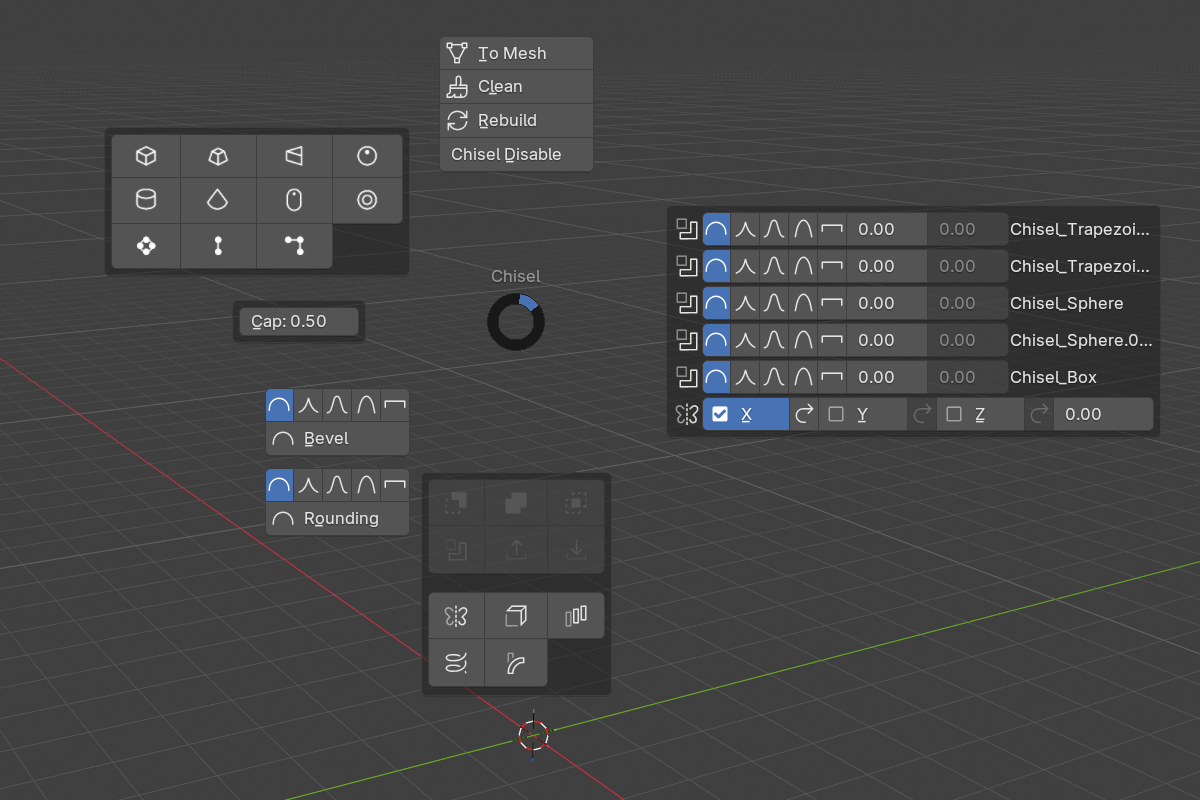
Wedges
- NW — Add Primitive — full grid of primitive types with custom icons
- N — Convert / Rebuild — quick access to mesh conversion and proxy rebuild
- NE — Modifiers — boolean Difference / Union / Intersect, mirror, array, solidify, emboss/engrave shortcuts
- W — Profile picker — Round / Sharp / Soft / Tight / Chamfer for the active primitive or boolean
- E — Adjust — invoke the Adjust Rounding / Mirror Smooth modal on the active object
- SW — Renderer toggle — switch between Chisel and EEVEE
- S — Veil / Unveil — quickly hide non-rendered objects
The exact contents adapt to the current selection — modifier rows for the active object, primitive type for adjustment, etc.
Status warnings
The pie menu also shows status warnings when relevant:
- “Shaders not compiled — first run may take longer” — appears when shaders are still compiling. The warning includes a manual Recompile Shaders button.
- “OpenGL backend, Vulkan is much faster” — appears when Blender is running on OpenGL. Switch to Vulkan in
Edit → Preferences → System → Backend.
Profile shortcuts
The profile row in the pie menu sets the rounding profile on the active selection. It works on:
- The primitive’s Rounding Profile (if you’re hovering over a primitive)
- The active boolean modifier’s Blend Profile (if you’re hovering over an object with one)
- The active emboss / engrave modifier’s Inner Profile (depending on context)
See also
- Draw Tool — drag-to-place primitive placement
- Keymap — full hotkey list
- Rounding & Blending: Profiles — profile descriptions