
Primitives
Primitives are the building blocks of every Chisel scene. Each one is defined by a math function, so surfaces stay perfectly smooth at any scale and rounding is a constant — not a subdivision setting.
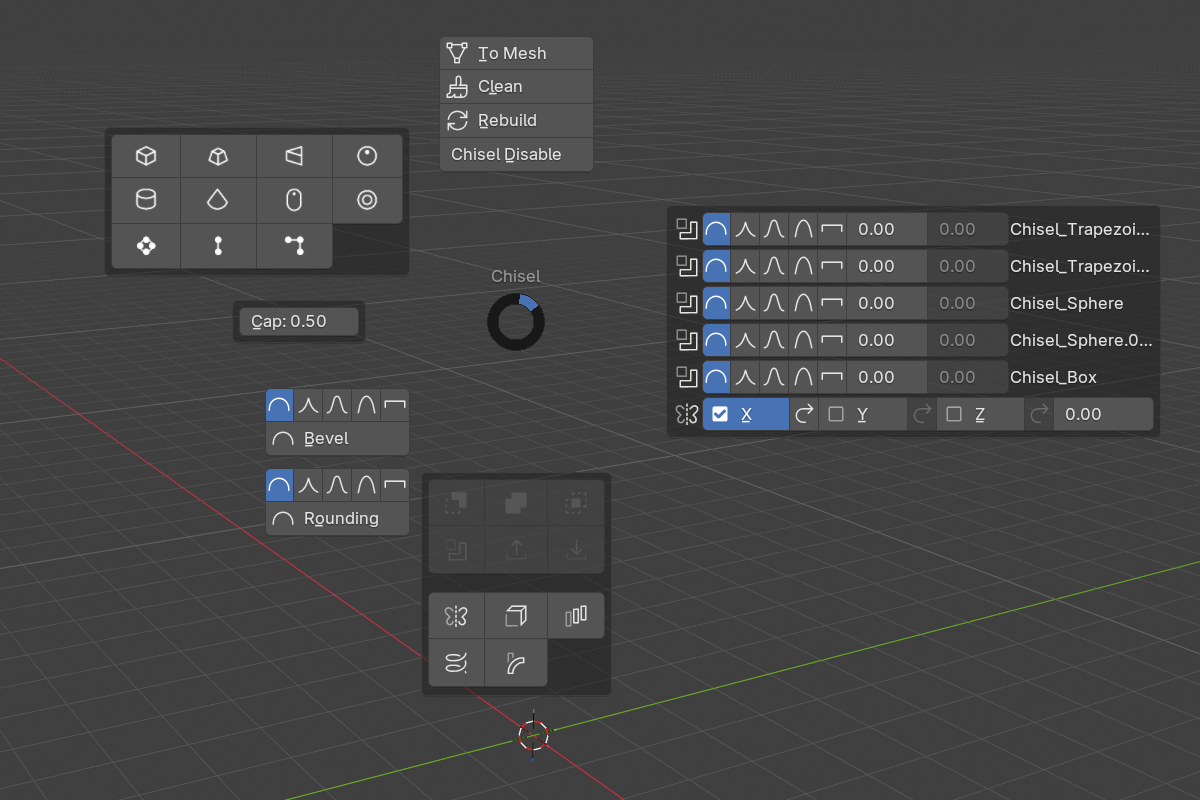
Adding a primitive
Three ways to create one:
Shift + A → Chisel— Blender’s add menu, with custom Chisel iconsQ(pie menu) → North-West — primitive grid- Draw tool — activate the Chisel tool in the toolbar, then LMB-drag in the viewport. The primitive is placed under the cursor and scaled live as you drag.
The draw tool aligns the new primitive based on its Align option:
| Align | Behavior |
|---|---|
| Normal (default) | Surface normal under the cursor |
| World | World axes |
| Local | Object-local axes under the cursor |
| Cursor | Blender’s 3D Cursor orientation |
Press D while the draw tool is active to open the shape and operation picker popup. Use it to swap between primitive types (Box, Sphere, Cylinder…) and operations (Add, Difference, Union, Intersect, Slice, Emboss, Engrave) without leaving the viewport.
Common parameters
Every primitive lives on a regular Blender object. Its SDF settings are in the Object Properties panel under the Chisel section.
- Is Chisel — toggle SDF mode on/off
- Primitive Type — change the shape after creation
- Half-Extents (X, Y, Z) — bounding extents along each axis, derived from the object’s scale
- Rounding (most primitives) — edge radius (
0.0–10.0, soft max2.0, default0.0) - Profile (most primitives) — Round / Sharp / Soft / Tight / Chamfer
- Chamfer Smooth (only when Profile = Chamfer) — softens where the chamfer meets the faces (
0.0–5.0)
Sphere, Torus, and Capsule have no rounding option — their surfaces are already smooth by construction.
Categories
- Standard Shapes — Box, Sphere, Cylinder, Cone, Capsule, Torus, Prism, Trapezoid
- Curve-Based — Curve (extruded 2D), Curve Tube (3D Bezier sweep), Curve Revolve (profile revolution)
Quick reference
2 items under this folder.