
View Markdown
Quality
The Quality group controls how rays advance through the scene. Higher settings = sharper surfaces, slower frames.
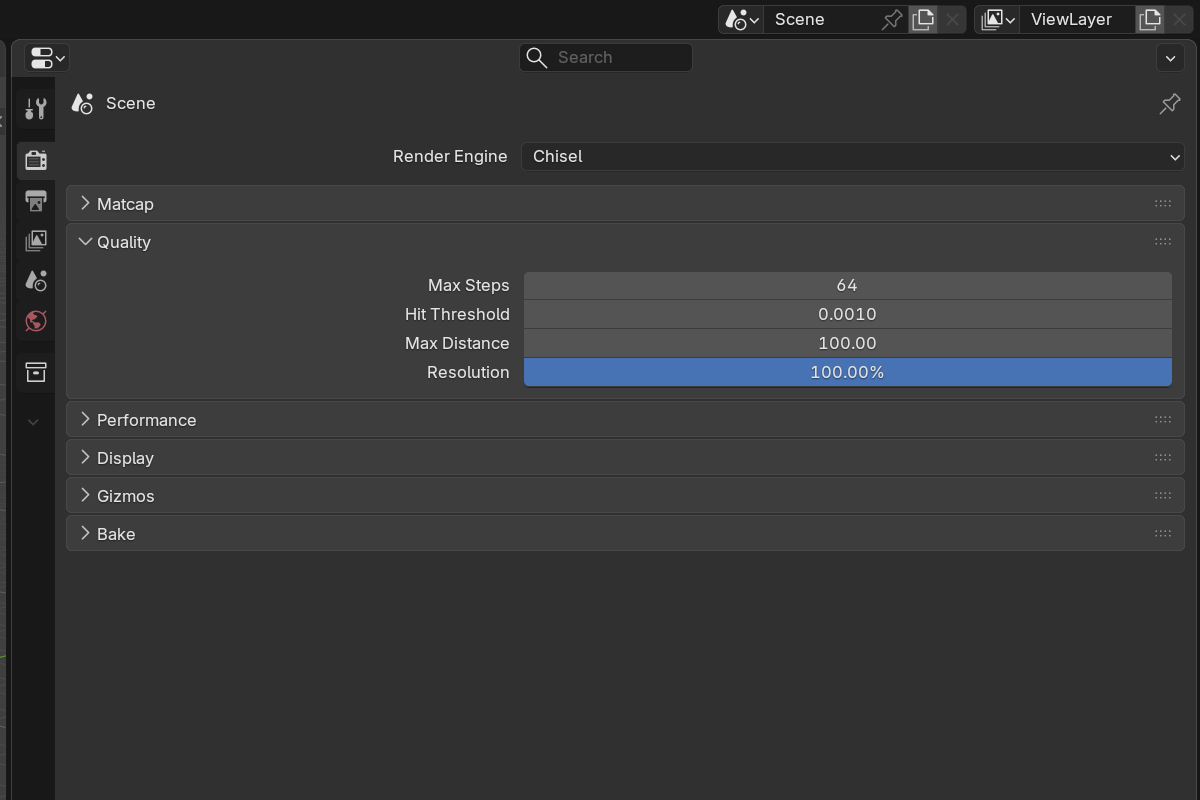
Parameters
- Max Steps —
16–4096, default64. Maximum ray-marching iterations per pixel. Raise if surfaces look chunky at silhouettes; lower for speed. - Hit Threshold —
0.0001–0.01, default0.001. Distance under which a ray is considered to have hit. Lower = more precise contact, especially for thin features and tight corners. - Max Distance —
10–1000, default100. Hard cap on ray travel. Increase if far objects fade out unexpectedly. - Render Resolution —
1–100%, default100%. Internal render resolution as a fraction of the viewport. Drop to50%on a small monitor for an instant 4× speedup. - Region Clip —
10–100%, default100%. Renders only a centered fraction of the viewport. Useful for scrubbing animation while editing without rendering pixels you can’t see anyway.
When to raise each setting
| Symptom | Setting to raise |
|---|---|
| Silhouettes look chunky / pixelated | Max Steps |
| Tight corners or thin features look soft | Lower Hit Threshold |
| Far objects fade to nothing | Max Distance |
| Need higher fidelity at the cost of speed | Render Resolution |
| Want a smaller render area while editing | Region Clip |
When to lower each setting
| Symptom | Setting to lower |
|---|---|
| Viewport is sluggish | Render Resolution (biggest win) |
| Too much detail isn’t visible | Max Steps |
| Working on a small monitor | Render Resolution |
| Animating, only care about a region | Region Clip |
See also
- Performance — adaptive quality during navigation
- Matcap — viewport shading