
View Markdown
Array
Repeat a shape along an offset (linear) or around an axis (circular). The whole array stays a single SDF, so you can keep stacking modifiers on top — booleans, mirrors, rounding — and everything composes cleanly.
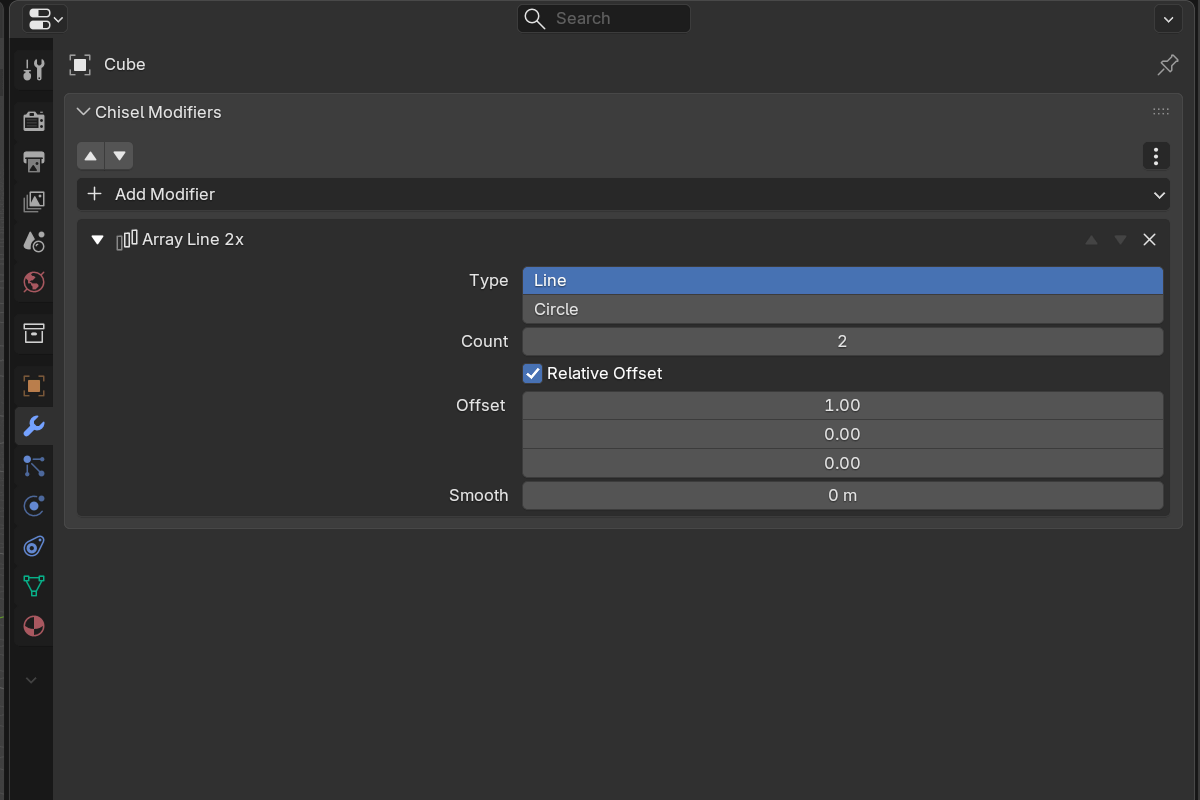
Linear array
- Type — Line (default)
- Count — number of copies including the original (
1–50) - Use Relative — when on, Relative Offset scales by the object’s bounding extents; when off, Offset is in world units
- Relative Offset (when Relative) —
Vector3, default(1, 0, 0). Each component is multiplied by the object’s bounding box on that axis. - Offset (when not Relative) —
Vector3translation in world units, default(2, 0, 0) - Smooth — blend radius between copies (
0.0–2.0, soft max0.5).0.0= hard union.
Linear array is great for fences, vents, ribbed surfaces, stairs — anything that repeats along a vector.
Circular array
Switch Type to Circle to repeat radially around an axis.
- Axis — X / Y / Z (default Z)
- Radius — circle radius (
0.001–100.0, soft max10.0) - Count —
3or more - Smooth — blend radius between copies
Blends and rounding stay consistent around the full ring. Use Circle for gears, screw heads, decorative rings, fluted columns.
Setup
- Select the source object.
- Add an Array modifier from the Add Modifier menu or the pie menu.
- Pick Line or Circle.
- Adjust Count and Offset / Radius to taste.
- Push Smooth up if you want the copies to blend into each other.
See also
- Mirror — for reflective symmetry
- Twist & Bend — combine with arrays for helical / curved repetition
- Boolean — booleans on top of arrays still work cleanly